
Halloween 2026 · AI costume try-on
AI Halloween Costume Try On
One selfie in, a costume photo out in about a minute. First preview free.
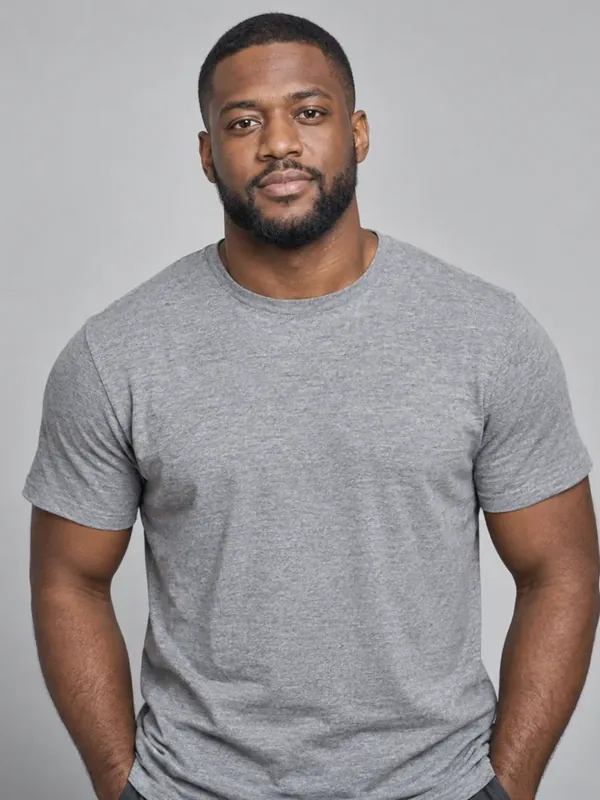 Original selfie
18+ · Photos deleted in 24h · No app
- First preview free
- Ready in about a minute
- Failed photos are never charged
- Deleted within 24 hours
Try it now
Make your photo
Pick a look, add one selfie, press the button.
For adults 18 and over only. Photos and results are deleted automatically within 24 hours, so download the ones you want to keep.
Already have credits? Sign in with Google
- Checking your photo
- Fitting the costume
- Adding makeup and lighting
- Final touches
Taking a bit longer than usual — almost there.
Your photos
Photos are kept for less than 24 hours.
Get more photos
Every photo: full HD · no watermark · never expires · failed photos free.
The basics
What is an AI Halloween costume try-on?
AI Halloween Costume Try On is an AI costume generator, or costume changer: it turns one selfie into a photo of you in a full Halloween costume. Upload a clear photo of yourself and pick a look: the AI dresses you up, with the costume, the makeup and a spooky background, while keeping your face recognizable.
Use it to decide on a costume before you buy one, to make a spooky profile picture for October, or just to see yourself as a vampire, witch or zombie before the party. It works in any phone or computer browser, with nothing to install.
Every costume is an original, generic design, not a character from a film, show, game or brand.
How it works
How to try on a Halloween costume with AI
Three steps, about a minute, straight from your phone. No app and no editing.
Upload one photo
Add one clear selfie: one adult, facing the camera, in good light. That is all the AI needs.
Pick a costume
Choose the vampire, witch or zombie look. Each one comes with its own outfit, makeup and spooky setting.
See it, unlock it, share it
Your preview is ready in about a minute, and the first one is free. Unlock the full-size photo with no watermark for 1 credit, then download it and share it.
Looks
Pick your Halloween costume
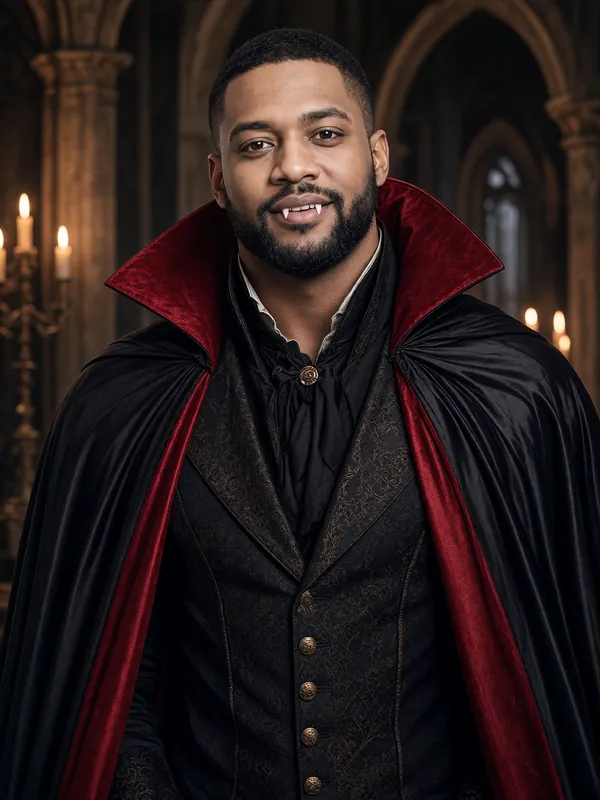
Example result Vampire
A black cape with red lining over a dark Victorian waistcoat, pale makeup and small fangs, in a candle-lit gothic hall.
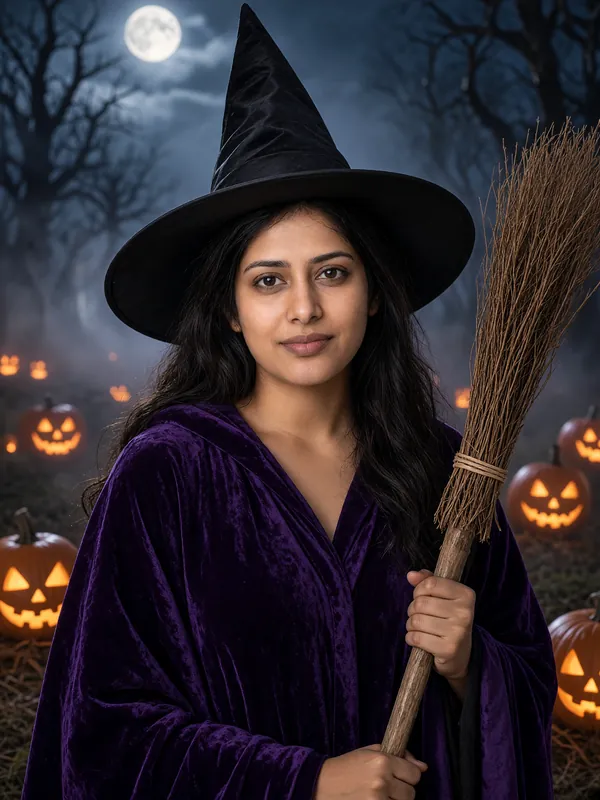
Make this lookExample result Witch
A tall pointed hat, a dark purple velvet robe and a wooden broom, in a misty pumpkin patch under the moon.
Make this look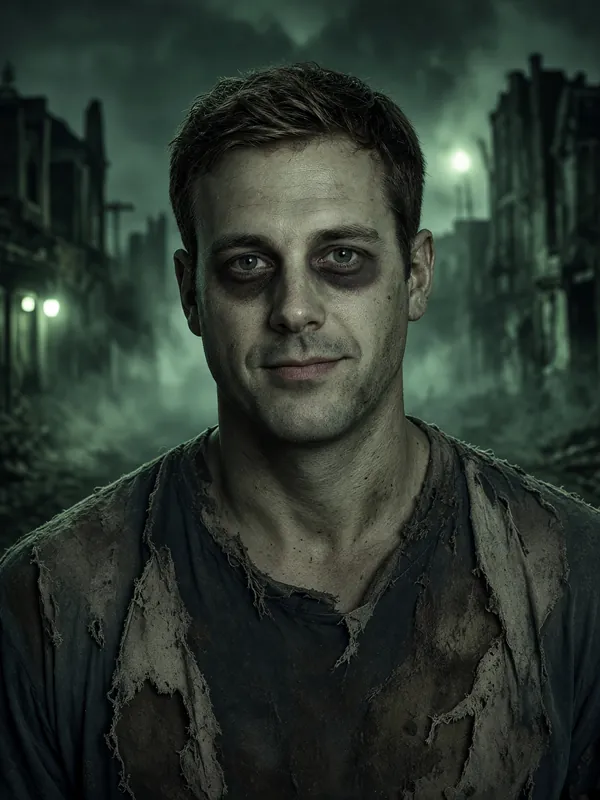
Example result Zombie
Torn, dusty everyday clothes and grey-green face paint, on a foggy street at night.
Make this look
Ideas
A costume photo for every Halloween plan
Try before you buy
See which costume suits you before you spend money on one or start on the makeup.
A spooky profile picture
Give your profile photo a Halloween look for the month of October.
Party invites and group chats
Send your costume photo with the party invitation, or drop it in the group chat to start the countdown.
The office costume contest
No time to dress up at work? Share a costume photo with your team instead.
More ideas
More Halloween photo ideas
- Halloween filter for photosTurn a selfie you already have into a vampire, witch or zombie photo.
- Zombie filterGrey-green face paint, torn clothes and a foggy street at night.
- Vampire filterA red-lined cape, pale makeup and small fangs in a candle-lit hall.
- Witch filterA pointed hat, a purple velvet robe and a broom in a moonlit pumpkin patch.
- Halloween PFP makerA Halloween profile picture made from your own selfie.
 Rumpelstiltskin costumeA velvet tuxedo jacket, a bow tie and the tiptoe pose in a barn full of hay bales.
Pricing
No subscription: buy credits once
One credit makes one full-size costume photo with no watermark. Your first preview is free.
25 credits
$4.99
25 credits = 25 costume photos
About $0.20 per photo
- Full size, no watermark
- Download and share anywhere
- Credits never expire
- Failed photos are free
50 credits
$9.99
50 credits = 50 costume photos
About $0.20 per photo
- Full size, no watermark
- Download and share anywhere
- Credits never expire
- Failed photos are free
- Best value
160 credits
$29.99
160 credits = 160 costume photos
About $0.19 per photo
- Full size, no watermark
- Download and share anywhere
- Credits never expire
- Failed photos are free
- You sign in with Google to buy, so your credits stay with your account.
- Credits never expire.
- If a photo fails or is blocked by our safety checks, your credit goes straight back to your balance.
- Photos you pay for have no watermark and can be downloaded.
- Your first preview is free: low resolution, with a watermark. We give out a limited number of free previews each day.
Why us
The easiest way to see yourself in a Halloween costume
Pay only for photos that work
If a photo fails or our safety checks block it, the credit goes straight back. Credits never expire.
One photo, one button
No prompts and no settings to learn. If you can take a selfie, you can make one.
Still looks like you
The AI keeps your face recognizable and changes what you wear and where you are.
Made for your phone
Works in any phone or computer browser, with nothing to install. Full-size photos are ready to post.
About $0.20 a photo
Buy credits once, with no subscription. Your first preview is free.
Your photos stay private
Uploads and results are deleted within 24 hours. We never sell your photos or use them to train AI.
FAQ
AI Halloween Costume FAQ
Who can use AI Halloween Costume?
Adults only. You must be 18 or over, and you can upload only a photo of yourself or one you have the right to use. Photos that appear to show anyone under 18 are rejected, and so are photos with no face or with more than one person. A rejected photo does not use up a credit.
Which website can put me in a Halloween costume using my own photo?
This one. Upload one clear photo of yourself, pick the vampire, witch or zombie look, and in about a minute you see yourself in that costume, with the makeup and a spooky background to match. It works in the browser on any phone or computer, iPhone photos included, and your first preview is free.
Can I see myself as a vampire, witch or zombie for Halloween?
Yes, one look per photo. The vampire gets a black cape with red lining, pale makeup and small fangs in a candle-lit gothic hall; the witch a pointed hat, a purple velvet robe and a broom in a misty pumpkin patch; the zombie grey-green face paint and torn, dusty clothes on a foggy street. The AI is made to keep your face recognizable, so you can judge which costume suits you. The first preview is free, and each photo after that uses 1 credit.
Can I make a Halloween profile picture from my selfie?
Yes. Upload the selfie you would use as your profile picture and pick a look. After the free preview, 1 credit unlocks the full-size photo with no watermark to download and use on Instagram, TikTok, WhatsApp or Discord. Because it starts from your own photo, your friends still know it is you.
Is there a free online zombie filter for my photo?
The zombie look works like a zombie filter on a photo you already have: grey-green face paint, dark circles and torn, dusty clothes, on a foggy street at night. It runs online in your browser with nothing to install. Your first preview is free but small and watermarked; the full-size photo with no watermark costs 1 credit.
What kind of photo works best?
A clear, well-lit photo of one adult facing the camera. Group photos and photos where your face is hidden are not accepted.
Can I try it for free?
Yes. Pick a look, add your photo and sign in with Google when you make it: your first preview is free. Free previews are low resolution with a watermark, and the number of free previews we can give each day is limited. If you like your preview, you can unlock its full-size version with no watermark for 1 credit.
How much do credits cost?
$4.99 for 25 credits, $9.99 for 50 credits or $29.99 for 160 credits. One credit makes one photo, and the biggest pack costs less per photo.
What if a photo fails?
If a photo cannot be made, or our safety checks block it, the credit is returned to your balance automatically. You do not need to contact us.
Do credits expire?
No. Credits never expire, so you can use them whenever you like.
How long do you keep my photos?
Your uploaded photo and the results are deleted within 24 hours. Download the photos you want to keep before then. We use your photo only to make your picture and check it for safety: Cloudflare hosts the site and runs, or passes your photo to, the AI models that do this. We never sell your photo or use it to train AI. What we keep longer holds no image: a short record of the safety check for 30 days, and your account and order records. One thing is outside our control: an AI provider may keep a request that its own safety check blocks for a limited time, under its own terms.
Do I need to install an app?
No. AI Halloween Costume works in the browser on any phone or computer. There is nothing to download or install.
How long does it take?
About a minute for most photos. Keep the page open while your photo is being made.
Can I try on a costume from a movie, show or game?
No. The costumes are original, generic designs (vampire, witch and zombie), not based on any film, TV show, comic, game or brand character.
Make your costume photo now
One selfie in, one costume photo out, in about a minute.